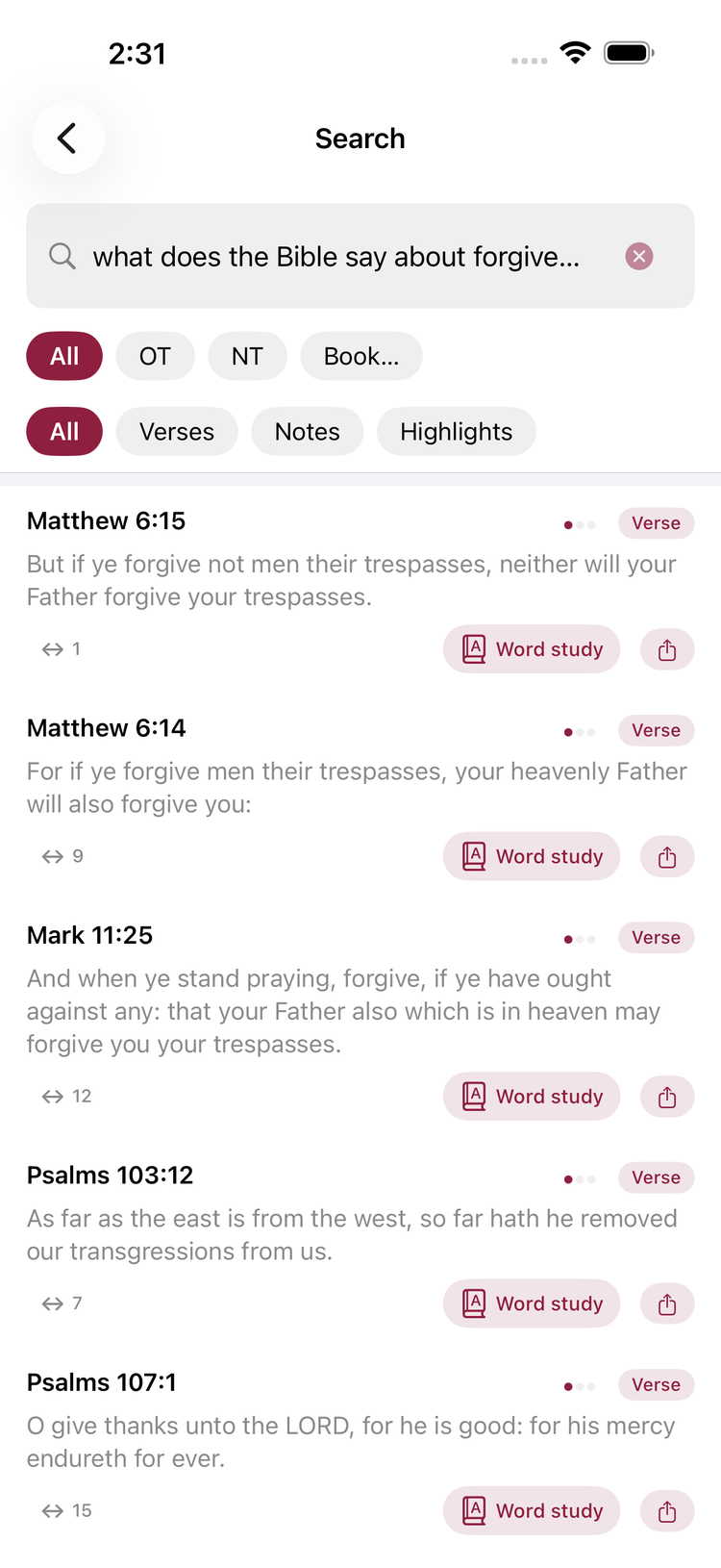
Ask a question in your own words and Crimson Bible finds the passage by meaning — offline, with no keyword guessing.
Most Bible search needs you to know the words in the verse before you can find it. Crimson Bible does not: type the question you actually have and it finds passages by meaning. The whole thing runs on your phone, so it works with no connection.
You do not need to phrase it like a search engine. Whole questions work better than keywords, because the meaning of the sentence is what is being matched.
Typing a reference goes straight there, and it understands book names in every language the app speaks:
John 3:16
Juan 3:16
創世記 1:1
Gen 1
If you type a phrase that appears verbatim in the text, it is meant to come back first on its own — you should not have to do anything special. Type a city set on a hill and that verse ranks at the top.
If you want to force a literal match and rule out anything else, put the phrase in quotation marks:
"a city set on a hill"
A quoted search looks only for those words in that order, and nothing is added to the query on your behalf.
Typing a Strong's number — H1254, g26, H 430 — looks it up directly in the concordance and lists the verses tagged with it, in canonical order. See Word study.
Above the results are two rows of filters:
KJV uses the complete multi-tier search — individual verses, surrounding windows, and whole passages — so it gives the most precise results. ASV and WEB search verse by verse only, so meaning-based results can be a little less exact. Other translations support reference lookup and exact-phrase search.
Semantic search is matching meaning, so an unexpected passage is usually a genuinely related one rather than a mistake. If results seem far off: